

Colour Bar Scanner service
Colour Bar Scanner service covers scan-head cleaning, rail alignment, and the checks that keep density readings stable across a full sheet width. Before a site visit, send the press model, scanner make, fault pattern, and whether drift shows on all units or only one colour. It also helps to note recent lamp changes, board grade, and any recurring errors after a restart.
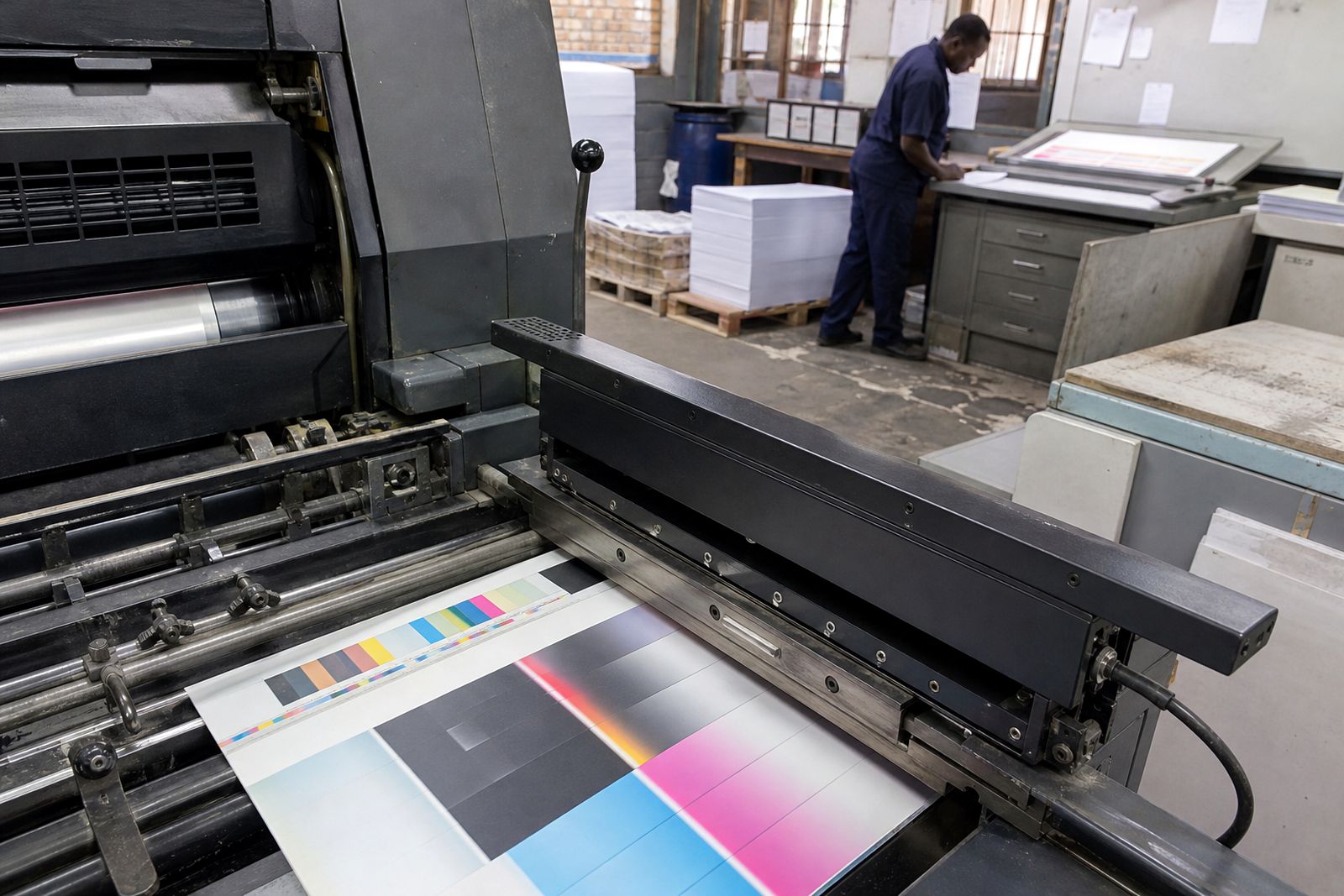
Scanner faults seen on shift
Salt spray and paper dust both affect optical readings, so the scanner window and reference strip need routine inspection. Packing gauges matter here because sheet position at the bar changes what the scanner sees, especially on lighter stocks. For a standing stock of wipes, lamps, belts, and reference patches, pair it with Pressroom spares kit.
- Clean scan glass and reference strip weekly
- Monthly packing gauge check
- Quarterly spare kit review
For a service booking, use the contact form and note the scanner model, press, and fault seen on the console. Photos of the colour bar readout, sensor head, or damaged cable help more than a general press image. Planned stoppages and generator windows matter in South African plants, so include the shift pattern if power interruptions affect access.
Colour bar scanner on real shifts
On South African commercial presses, scanner trouble usually shows as wasted sheets after a stop, not as a dramatic breakdown. Readings can wander when dust settles on the optics, when the bar sits too close to the gripper edge, or when humidity changes sheet lay through the feeder. Colour Bar Scanner service is there to verify that the device, the printed bar, and the press settings still agree under production conditions in Montague Gardens, Isando, and coastal plants.
Begin with the stock, bar position, and target densities used on the shift. A gloss sheet with a tight bar can scan very differently from uncoated work with more gain and a wider tolerance. We set out operator notes in short, usable lines so the press crew can check bar width, read stability, and sheet tracking without leaving a unit standing.
Keep the first accepted sheet from every form change and mark the time against the scanner reading. That sample shows whether the instrument drifted, whether the ink came in late, or whether the bar itself was printed badly. One labelled sheet often settles an argument faster than a memory from the end of the shift.
What the service covers
The visit focuses on scan-head condition, calibration checks, mounting position, and the printed bar the unit is expected to read. We also look at how the scanner behaves at production speed, after stoppages, and on the stock grades your room actually runs. When one route gives a better answer than another scanner adjustment, we say so and point you to Runs.
Scanner checks work best when they are tied to the run condition before extra variables are introduced. Read the paired note under Makeready so the density targets, bar position, and first-sheet routine use the same terms as the press crew. When you send details through our contact form, include stock, target density, screen ruling, and which unit the scanner is reading. Keep a spare packing gauge on hand if board and light paper alternate on the same shift.
- First good sheet kept with scanner reading
- Bar position checked against gripper and side lay
- Calibration verified after stoppage or lamp change
- Related: runs and makeready notes for press crews
Conditions that affect scanner readings
Highveld dust, coastal moisture, and generator changeovers all show up in colour control long before anyone blames the scanner. A clean instrument still reads badly if the bar is poorly placed, the sheet snakes at speed, or the printed patch is outside a sensible target range. Our notes keep the scanner in its proper role inside the press routine rather than treating it as a cure for every colour problem.
Near the coast, condensation can mark optics and reference surfaces when a press hall warms up quickly. Inland rooms often fight paper dust and static, which can alter sheet travel past the scan point on thin work. If the plant has moved beyond basic setup, mention the current scanner model, calibration routine, and any spare parts held on site so the visit can focus on the fault rather than first principles.
Figures worth recording daily
| Format / band | Density targets |
|---|---|
| Screen / role | Colour bar |
| Notes | Log first good sheet before rate climbs |
Keep one sheet for the scanner settings your team checks most often: target density, tolerance band, bar position, and calibration date. That record is more useful when it sits next to actual press notes on stock and screen rather than apart from them. For a bay sketch or service planning note, use the contact form and include the scanner name with the press details.
What our Offset Printing customers say
Verified Google reviews
Also worth a look
Tell us what your press room is running
Send a note through our contact form with your press make and format, the stocks and run lengths you handle, the plates, chemistry or blankets you use and your town, and we will come back with practical advice and a quote.
Open the contact form